I Tried All Three Levels of AI Memory. Only One Remembered My Business.
AI memory comes in three levels. In the first two, the AI decides what to keep — and it kept forgetting my business. Here is what the third level changed.

Subheadline: AI memory comes in three levels — and in the first two, the AI decides what to keep. Here is what changed when I moved to the third, where I do.
What are the three levels of AI memory?
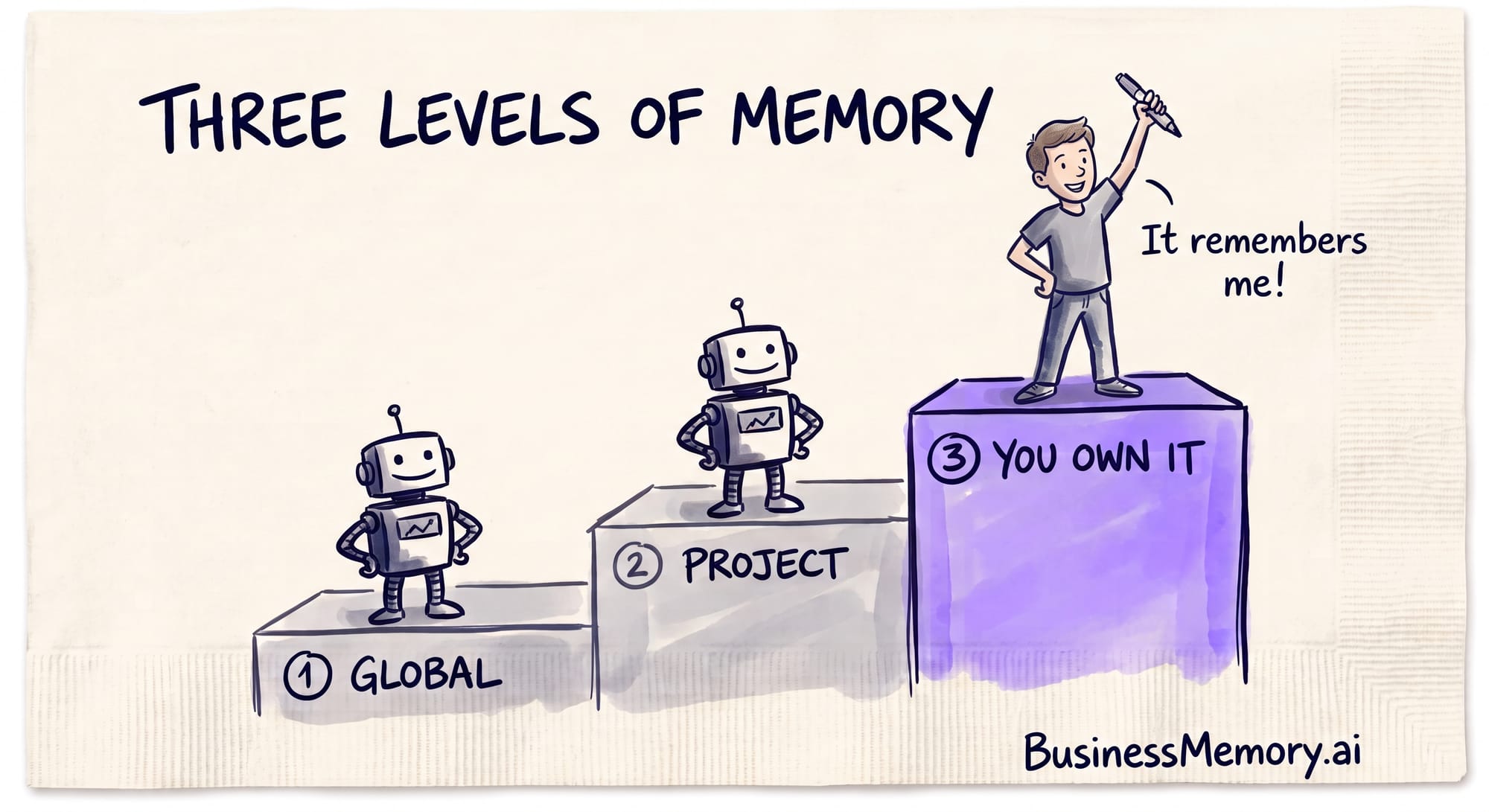
AI memory comes in three levels, and each one hands you more control than the last. Level one is global memory: account-level facts a chatbot saves about you and reuses in every chat — the kind ChatGPT and Claude keep deliberately thin, because anything stored there follows you into every conversation. Level two is project memory: context walled inside one project so the details stay put instead of leaking across your work — ChatGPT added project-only memory in 2026. In both, the AI still decides what to keep. Level three is a memory you own: plain files on your own computer that your AI reads at the start of every session and updates as you work. You decide what gets saved and where; the AI handles the upkeep. For a business, level three is the one that finally remembers the business — because you are the one who controls it.
| Level 1 — Global memory | Level 2 — Project memory | Level 3 — A memory you own | |
|---|---|---|---|
| Where it lives | The vendor's servers, tied to your account | The vendor's servers, inside one project | Plain files on your own computer |
| What it holds | High-level facts and preferences | Context for one project or client | Whatever you decide to record |
| Who decides what is kept | The AI | The AI | You |
| Can you open and edit it | A short list you can view | Usually not | Yes — every file, any line |
| Best for | Your name, your style, how you like answers | Keeping one project on track | A business that must remember itself |
What is global memory, and why does it stay so thin?
Global memory is the account-level layer. The chatbot saves a few facts about you — your role, your tone, how you like your answers — and carries them into every chat. It stays thin on purpose. Anything saved here follows you everywhere, so one wrong fact would poison every conversation at once. That is why it remembers that you prefer short answers, but not the deal you closed yesterday. Useful for the person. Too shallow for the work.
What is project memory?
Project memory draws a boundary around one workstream. Every chat inside the project shares the same context, so the details stay put instead of leaking into unrelated conversations. It is a real step up — the AI can hold far more about one job. But the AI is still the author. It decides what to keep and what to drop, and you cannot open the memory and fix it. When it quietly forgets something you needed, you find out too late.
What is a memory you own?
A memory you own is not a setting inside someone's app. It is a set of plain files on your own computer. Your AI reads them at the start of every session and updates them as you work — but you decide what gets saved and where, and you can open any file and change a line yourself. The newest AI tools work this way: they read a folder of plain files you keep on your own machine, at the start of every session. Same idea as the levels below it, with one difference that changes everything — the memory has an owner, and it is you.
How I climbed all three levels
I did not learn this from a guide. I lived it.
Last year I put AI to work inside my own businesses — supply, rentals, real estate. I switched on its memory, exactly the way the setup screen told me to.
A day later, I came back, and it had forgotten the work.
It knew my name. It knew I like short answers. It did not know the deal I had spent the whole afternoon on. Level one had saved the small stuff and dropped the thing that mattered.
So I moved the work into a project. That helped. Everything inside it stayed on topic.
But the AI was still holding the pen. I pasted in a list of names one week, and the next week it had quietly decided those names were not worth keeping. I never chose what it forgot. It chose for me.
That is when it hit me. In both levels, my business's memory had an owner — and it was not me.
So I built the third level myself.
Now my company's memory is just files — plain text, on my own computer. A four-megabyte contract gets stripped down to twenty-two kilobytes of clean words. Thousands of those small files sit in one folder on my hard drive, and my AI reads them before it does anything else.
The day it worked, I opened a brand-new session and asked it, cold, where a project stood. It gave me the date, the open items, all of it — because it read my files first, instead of guessing.
For the first time, the AI knew my business.
Now the honest part, because you should hear it from me. This level takes real work to set up, and it does not feel like the chat box you are used to. I will not pretend it does. But it is the only level where I decide what my business remembers — and where I can open the drawer and see it.
That is what a business memory is. A business memory is a private record of everything your business knows — what was agreed, paid, promised and decided — kept on your own computer as plain text files any AI can read, so you can ask anything and get the answer with the exact reference behind it.
Give your business a memory it can trust.
#BeBusinessSmart
Frequently asked questions
What are the three levels of AI memory?
Level one is global memory: account-level facts a chatbot saves about you and reuses in every chat, kept deliberately thin. Level two is project memory: context walled inside one project so it does not leak across your work. Level three is a memory you own: plain files on your own computer that your AI reads and updates, but that you control. Control rises with each level.
What is the difference between global memory and project memory?
Global memory is account-wide — a few high-level facts the AI carries into every chat, so it stays shallow on purpose. Project memory is scoped to one workstream, so the AI can hold far more detail without it bleeding into unrelated chats. In both, the AI still decides what to keep; you cannot open the memory and edit it yourself.
Can you control what an AI remembers?
Only partly, in the first two levels — you can correct it, but the AI is the author and picks what to keep. Full control comes at the third level, where your memory is plain files on your own computer. You decide what gets saved and where, the AI does the upkeep, and you can open any file and change a line yourself.
Where does a memory you own actually live?
On your own computer, in your own files — plain text you can open, read and edit. Your AI reads that folder at the start of every session and updates it as you work. Because the files live with you, not on a vendor's servers, you are the owner of what your business remembers, and you can see it with your own eyes.
Takeaway: A business memory is a private record of everything your business knows — what was agreed, paid, promised and decided — kept on your own computer as plain text files any AI can read, so you can ask anything and get the answer with the exact reference behind it.