How Business Memory Works
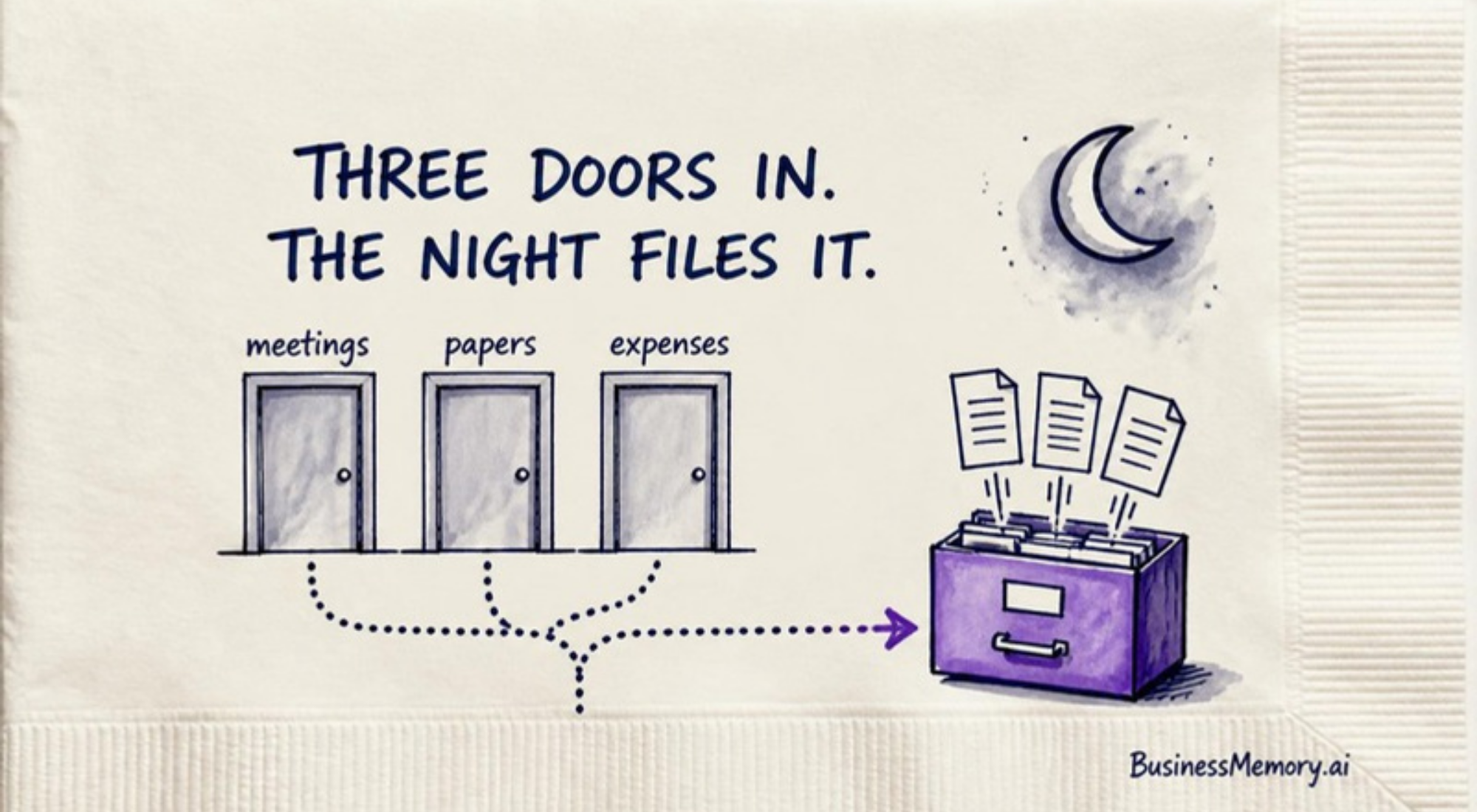
Three doors let your work in. The night files it. The morning shows you what was filed. And every answer comes with its file.

Three doors let your work in. The night files it. The morning shows you what was filed. And when you ask, the answer comes with the file it came from.
How does Business Memory work?
In four steps, and only the first one is yours.
Your work comes in through three doors: meetings, papers and expenses. Overnight, Business Memory files each piece by what it is about, not by which folder you remembered to open.
Every morning, one page shows you what was filed, and asks you about anything it could not place. Then, any time you want, you ask the AI you already use, and the answer comes with the file behind it.
A business memory is a private record of everything your business knows — what was agreed, paid, promised and decided — kept on your own computer as plain text files any AI can read, so you can ask anything and get the answer with the exact reference behind it.
What does one day with Business Memory look like?
Picture a normal Tuesday. Nothing special happens. That is the point.
10:00 in the morning. You meet a customer about a new kitchen. Somebody takes notes, or the call is recorded. That is the first door: meetings.
2:30 in the afternoon. The signed quote comes back as a photo on your phone. That is the second door: papers.
4:00. You pay for the first load of materials. That is the third door: expenses. One line for the payment, filed by what it was for.
6:00 in the evening. You go home. You leave the computer on.
Overnight. Business Memory reads what came in and files each piece with the customer and the job it belongs to. The meeting notes, the quote and the payment end up side by side, because they are about the same kitchen.
Then it hits a problem. The new customer is named Ferreira. You already have a customer named Ferreira.
So it does not guess. It sets that one item aside.
7:00 the next morning. One page is waiting for you. What came in, where it went, and one question at the top: which Ferreira?
You answer in one sentence. Done.
The date on that page matters, too. Today's date means last night's filing is done. An old date tells you something stopped, and you know it the same morning, not three weeks later.
Next March. The customer calls. "What did we agree on the cabinets?"
You ask. The answer comes back with the quote it came from. You open that file with one click and read the line yourself.
You did your work on Tuesday. Business Memory kept the record.
What do I have to do, and what does Business Memory do?
Your part is small. Let the work come through the doors, keep the computer awake, and answer the morning question when there is one.
Its part is everything after that. It sorts, it files, it links each piece to the people and the jobs it belongs to, and it tells you when it is not sure instead of pretending.
That last part is the one people notice. "I don't know" is not a weakness. A memory that guesses which Ferreira is a memory you have to check forever.
What will Business Memory not do?
You should hear this from us, not find it out later.
- It will not hear what nobody wrote down. A call nobody recorded or noted is a call it never heard.
- It will not decide for you. It is not a CRM, a to-do app, a calendar or an accounting tool. It keeps the record. You make the calls.
- It will not work on a sleeping computer. The record lives on your machine, so your machine has to be awake, with the app open.
- It will not put your record on our servers. You have no account with us, and there is no copy of your business on a machine you do not own.
- It will not be perfect in week one. The first month takes about ten minutes a day. Then less.
How long does setup take, and what does Business Memory cost?
About an hour for an interview that teaches it your world: your people, your customers, your jobs. Then an afternoon for the install.
The Kit is $250, once. The Concierge Install, where we set it up with you, is $1,000, once. Both are launch prices. Nothing recurring from us, and no charge per person.
Then two things you pay for on your own. An AI plan, bought straight from the AI company — Claude's Pro plan is $20 a month. And Obsidian, the app where the files live, which is free. Obsidian does ask companies to buy an optional work license, but it is not required.
Why does it work this way?
Because the busiest owner in town still has to remember everything.
Think back to that Tuesday.
The promise lived in a meeting. The price lived in a photo. The payment lived in a bank app.
Three places, one kitchen, and you were too busy to put them together. Business Memory did it while you slept.
You do the work. Business Memory keeps the record.
We run our own businesses this way, every day. So I'm committed to keeping it simple enough that the doors, the night and the morning page are all an owner ever has to think about.
A business memory is a private record of everything your business knows — what was agreed, paid, promised and decided — kept on your own computer as plain text files any AI can read, so you can ask anything and get the answer with the exact reference behind it.
Your work walks in the door every day. It should NEVER walk back out.
Records were never meant for storage. Give your business a memory.
Questions
How does Business Memory work?
In four steps. Your work comes in through three doors: meetings, papers and expenses. Overnight it is filed by what it is about. Every morning one page shows what was filed and asks about anything unclear, and when you ask the AI you already use, the answer comes with the file behind it.
What are the three doors of Business Memory?
Meetings, papers and expenses. Meetings are recorded or noted. Papers are contracts, receipts and photographs, filed by subject. Expenses are one line per payment, filed by what the money was for.
What happens when Business Memory is not sure where something goes?
It does not guess. Two customers with the same surname, or a note that could belong to your family or your company: it sets the item aside and asks you one sentence on the morning page. Your answer files it.
How much does Business Memory cost?
The Kit is $250 once and the Concierge Install is $1,000 once, both launch prices, with nothing recurring from us. You also pay for your own AI plan — Claude starts at $20 a month — and Obsidian, where the files live, is free.